Local-first: why Sixgree has no account, no server and no telemetry
Sixgree keeps your network in one folder on your own computer. What that means in practice, what the app contacts and when, and the protections that come with running on localhost.
4 min readBy Blake Burford
A map of your network is a map of other people: their names, their jobs, who they know. That's a good reason not to send it anywhere. So Sixgree doesn't. There's no account to create, no server that holds your data, and no telemetry. The app, and everything it knows, runs on your own computer.
This post explains what that means in practice, and where the edges are.
One folder
Everything Sixgree knows about your network lives in one hidden folder in your home folder, .six-degrees:
the network itself, in a single SQLite database file;
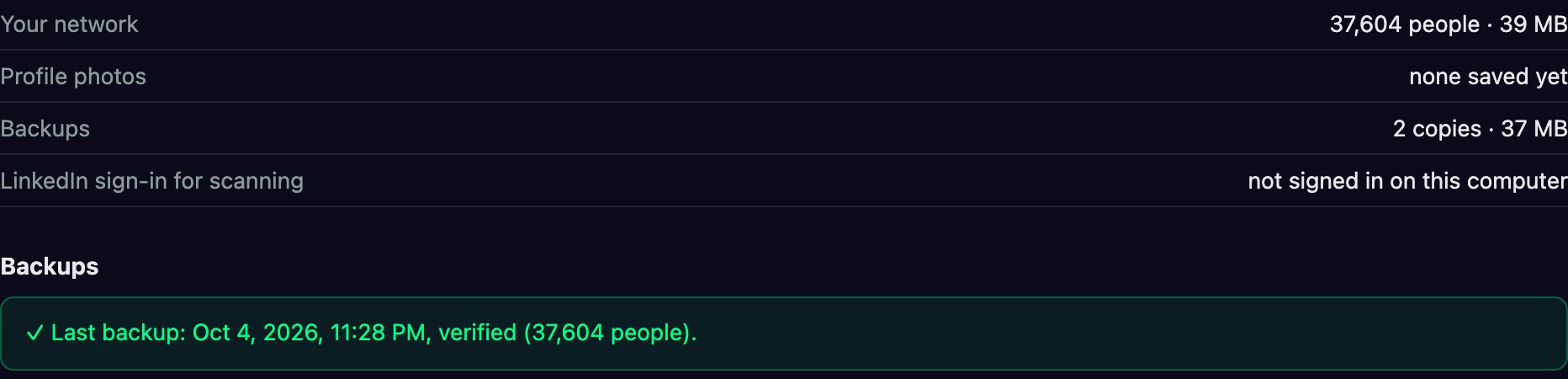
backups/, your network with its photos, backed up once a day while the app is open, before each new version first opens it, and before an import or a restore, each one checked as it's made;
avatars/, the profile photos a scan saved;
chrome-profile/, the scanner's signed-in Chrome, if you scan;
small files for the scanner's budget, cooldown and progress.
Settings → Your data shows where the folder is, what each part takes up, and the backups in it. Delete the folder and Sixgree knows nothing. A LinkedIn CSV you import is kept there too, in csv-network.json, apart from any network you scan, until you remove it.
What the app contacts, and when
Nothing goes online by itself. The app contacts:
LinkedIn, only while you scan, or when you press Auto to send someone a connection request. Each profile photo is saved on your computer as the scan reads it, and the app shows photos only from there, so browsing your network never contacts LinkedIn.
GitHub, only when you click Check for updates, to read the newest version number, and in the Mac app when you then click Install and restart, to download it.
PyPI and GitHub, only without the Mac app (with npx sixgree or from source), once, when you click Set up the scanner: for the scanner's Python packages and, if your computer has no Python it can use, a private copy of Python. Every file is checked against a checksum built into Sixgree.
One experimental feature runs on a timer, and only if you turn it on: the daily messages sync in Outlink → Messages & follow-ups opens LinkedIn once a day, in the daytime, while the app is open. It's off until you tick it.
There is no telemetry, no analytics and no crash reporting. The web framework the app is built on has anonymous usage statistics of its own; they're switched off. And the app never checks for updates on its own.
Local, and locked to your computer
The app is a small web server that listens only on your own computer, at 127.0.0.1, and opens in a window (or your browser, on Linux). Running on localhost brings its own risks, and the app guards against them:
Other websites can't drive it. Any web page you visit can try to send requests to a local server. Sixgree refuses writes whose browser headers say they came from another site, including another port on your own computer, and answers requests addressed to any other hostname with an error, which blocks a trick called DNS rebinding.
If it's ever exposed, the dangerous routes lock. The ten routes that delete, replace or export your data, start the scanner or update the app need an ADMIN_TOKEN whenever the server is bound to any address other than your own computer. Unset, they refuse every caller.
Because there's no account, there's no sync. To take your network to another computer, Settings → Your data → Export backup file… makes one file that you move yourself. It's built from an allow-list: your network, your settings, the scanner's progress and its LinkedIn budget, and photos if you want them. Your LinkedIn sign-in never goes in.
The other computer treats the file as untrusted. It checks the database's integrity and its structure, and each file's SHA-256, before anything changes, and applies it the next time the app starts. What was there before goes into backups/, and stays for at least 30 days.
Updates you can check
When the Mac app updates itself, it checks the download against the release's published SHA256SUMS file and verifies its code signature, bundle and version before putting it in place. If the new version won't open, the old one is put back. The one-line Terminal install does the same checksum check. Since 1.0.0 the Mac app is also signed by Blake Burford and notarized by Apple, which macOS checks when you open it.
Open, so you can check
None of this has to be taken on trust. Sixgree is open source under the MIT licence, and every line described here is on GitHub, with tests. That's the other half of local-first: a tool that reads your network should be one you can inspect.
The Galaxy is a force simulation. The physics lab hands you its controls: what each slider does, the Clusters preset, colour by, find, and a replay of your network by the day you connected that you can save as a video.
How the optional Sixgree scanner paces itself, the daily and monthly budgets it keeps to, why it stops at the first push-back, and what the risk to your LinkedIn account really is.
How Sixgree ranks everyone two steps away, counts every way in, and finds the people only one of your connections can reach, with the formulas, and the invented sample network as the example.