The R&D behind our scanner: finding breaking points so you don't have to
How we stress-tested scanning limits, analyzed session boundaries, and engineered hard stops and pacing to protect your account.
3 min readBy Blake Burford
When people first hear about a desktop tool that maps second-degree connections, their first question is almost always about account safety: “Will this get my account restricted or banned?”
It is a fair question. Aggressive, irresponsible cloud tools and browser extensions have burned accounts for years by hammering servers with hundreds of rapid requests per minute.
From day one, our design priority for Sixgree was not raw speed. It was deep R&D on the platform's detection boundaries, rate limits, and behavioral breaking points so we could engineer hard stops, human-mimicking pacing, and multi-layer safeguards.
Here is what our research uncovered, where the actual limits lie, and how our scanner is engineered to keep your account safe.
The testing: mapping the limits
To understand where platforms draw the line, we conducted extensive testing across real sessions:
Volume ceilings vs. Burst rate: We discovered that total daily connections read mattered far less than burst velocity. Navigating 50 profiles in 3 minutes triggers instant security checks, whereas browsing 50 connections spaced over an hour with variable human-like pauses looks completely organic.
Session continuity: Opening parallel headless browsers or injecting artificial DOM queries from unauthenticated cloud IPs is an immediate red flag for anti-automation systems.
Pagination friction: Rapidly paginating through deep search result lists without human scroll intervals triggers challenge checkpoints (CAPTCHA / email PINs).
What we learned: where the breaking points are
Our research identified the core triggers that cause automated account warnings:
Exceeding 100 connection profile inspections per day on standard accounts without pauses.
Fixed-interval requests (e.g., exactly 2.0 seconds between every click), which automated bot-detectors easily flag.
Once we knew the breaking points, we built Sixgree to stay well below them.
The safeguards engineered into Sixgree
Instead of pushing the limits, Sixgree operates with strict, non-negotiable conservative boundaries:
1. You sign in; the app never touches your password
The scanner runs inside a real, dedicated Chrome window on your local machine. You sign in directly through the platform’s official login page. Sixgree never sees, stores, or transmits your credentials. All cookies stay within your own local session.
2. Strict daily and monthly budgets
Sixgree caps its scan rate with conservative default budgets:
Daily safety caps: Default pacing caps reads at low, realistic thresholds (e.g., 20–50 connections per day depending on your pace setting).
Monthly ceilings: Automatic halts prevent you from approaching monthly search or commercial usage limits.
3. Jittered human-like pacing
Rather than robotic intervals, Sixgree introduces randomized delays, scroll offsets, and pause intervals between each connection read, mirroring how an actual person browses their network.
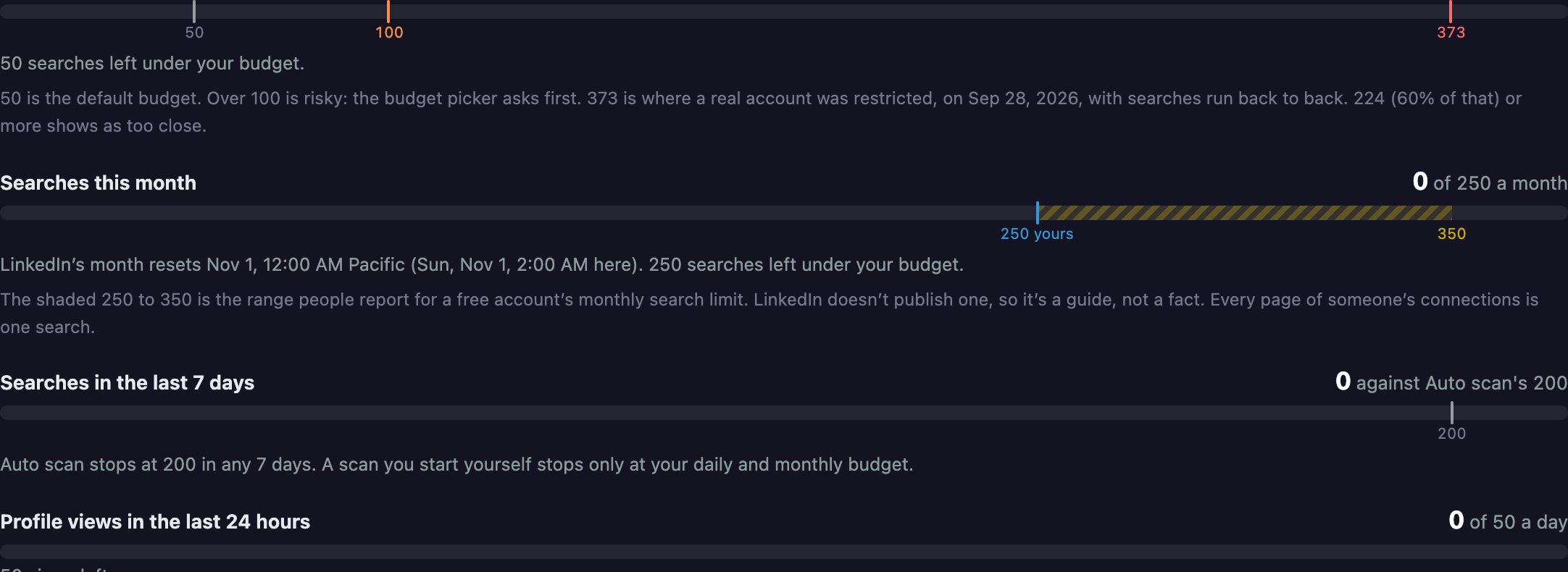
Visual budget caps and rate limits configured inside Sixgree.
4. Instant hard stops at the first sign of friction
The scanner is programmed with an immediate fail-safe:
If a rate limit notice, unexpected redirect, or security prompt appears, the scanner instantly terminates.
It does not attempt to bypass challenges, solve CAPTCHAs, or retry automatically. It halts immediately and logs the reason locally.
The safest path: optional scanning or zero-risk CSV
Finally, we designed Sixgree so you never have to scan if you don't want to:
The platform's official data archive: You can download your official connection CSV directly from the platform (Settings & Privacy → Data Privacy → Get a copy of your data) and import it into Sixgree with zero automation and zero account risk.
Interactive sample network: Test every visualization, cluster, and path feature with our built-in 150-connection sample network before ever connecting a real account.
We spent months finding the breaking points of web automation so you don't have to risk your account. Sixgree is built to be a reliable, local-first intelligence engine that respects both your privacy and your long-term reputation.
The desktop app can now show the platform in a panel inside Sixgree's own window, with your network in a sidebar. What the browser plugin does, what counts as a profile view, and the trade-offs, including a local debugging connection.
In our own testing, roughly the same number of search pages led to a restriction at about 4 seconds apart and to nothing at about 50. Here's what that taught us, and why scanning by hand now takes a 20-second break every 10 pages.
The Map tab puts your network on a world map, matched on your own computer against GeoNames cities. Pick a city to see which connections reach people there, or pick a connection to see where their circle lives.